3D mockup generator
Turn press-ready artwork into photorealistic 3D product images (any angle, real materials, real finishing) without booking a studio, shipping a sample or opening a mockup template.
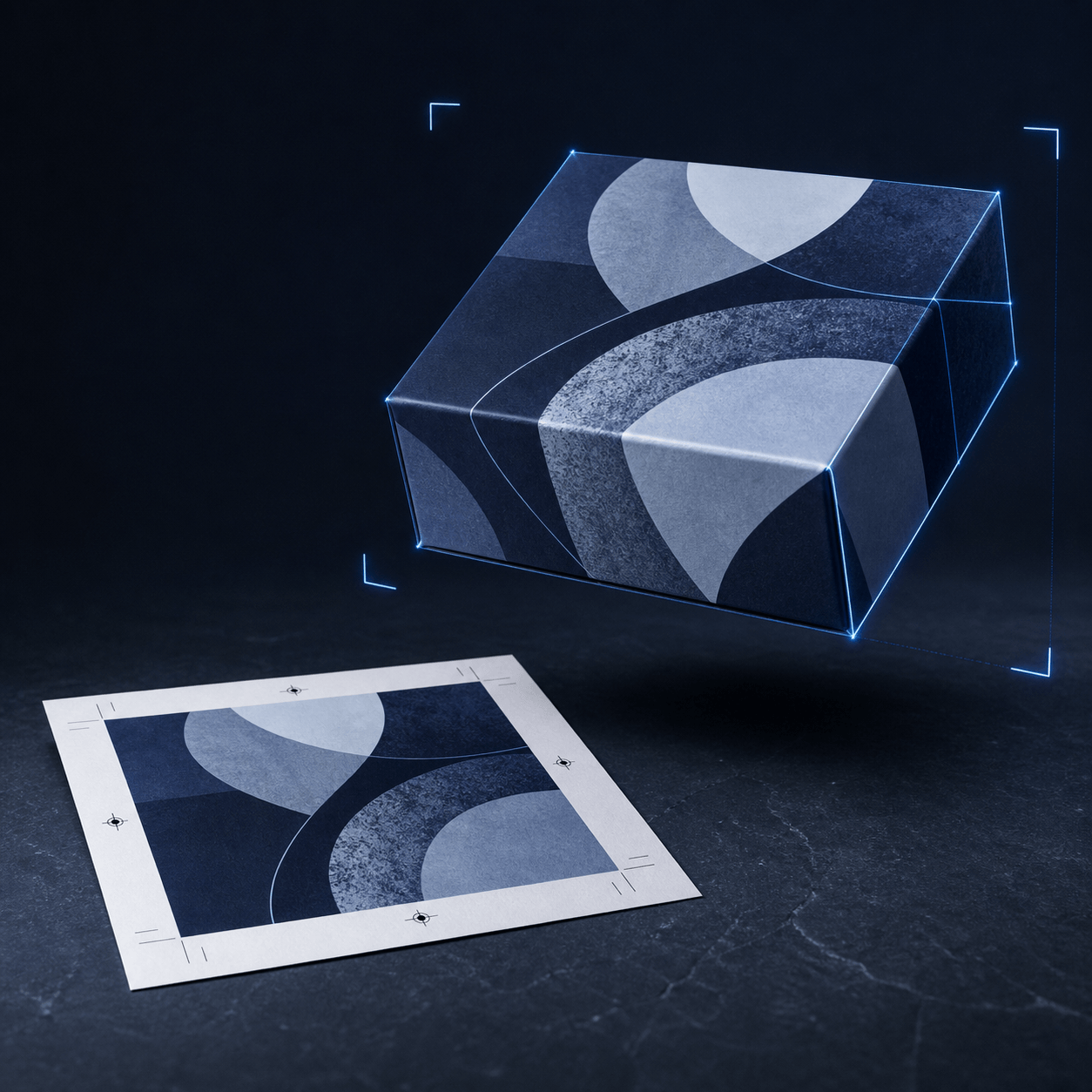
From the same file you send to plate
A mockup is not a separate asset you commission. ProofScene builds the product from the press-ready artwork and specification you already hold, then photographs it virtually, so the box above and the proof sheet under it come from one file rather than a studio booking.
See how the model is builtProduct photography, built from the print file
Everything you need to show a product that exists (or one that is about to) without any of the logistics that normally sit between artwork and an image.
Photoreal without a photographer
No studio booking, no sample shipped to a set, no retoucher. The product is rendered from the artwork and specification you already hold.
Many angles from one file
Hero three-quarter, straight-on front, back panel, detail crop of the foil. Pick the frames you need instead of the frames the shoot happened to capture.
True product geometry
Cartons fold correctly, cards have real thickness, labels wrap the container. The mockup is a model of the product, not artwork skewed onto a stock photo.
Finishes that read on camera
Foil catches light, spot UV sits proud of matte lamination, emboss casts a shadow: the details that make a mockup look manufactured rather than printed onto a JPEG.
Batch, not one at a time
Point ProofScene at a folder of past proofs and get a product image for every one of them, in the same look, in one pass.
Regenerate when artwork changes
New version of the label? Regenerate the image set instead of rebooking the shoot and reshooting the range.
Artwork in, product images out
- 01
Bring the artwork
Start from press-ready artwork or an existing proof: the same files you already keep on the job.
- 02
Pick the product
Set the construction and dimensions: carton, card, label, garment, bottle, tote, or a shape matched to your dieline.
- 03
Choose materials and finish
Substrate, lamination, foil, spot UV, emboss: the mockup inherits the finishing spec of the real job.
- 04
Generate the images
Render the angles you want, download them, and use them anywhere. Or share the interactive model as a link.
Four places a print shop runs out of pictures
Most shops have produced beautiful work for years and can show almost none of it. Every job that leaves the building takes its photograph with it.
Winning the quote
Send a prospect a picture of their own product instead of a generic sample of somebody else's. It is a different conversation.
Your website and catalog
Populate a capability page or product range with real work, at consistent quality, without waiting for a customer to send back a photo.
Social and campaign assets
Regular, on-brand product imagery from work you have already done: the hardest content problem a print shop has.
Customer marketing packs
Give the customer clean images of their finished product to use themselves. It is a service most suppliers do not offer.
Rendered images represent appearance, placement, materials and finishing. They are not calibrated contract-color proofs unless a color-managed workflow is used, and if you send a mockup to a customer, say plainly whether it is a marketing image or a proof.
The same model, doing two different jobs
A mockup and a virtual proof are built from identical information, but they are pointed at different problems. A mockup is chosen: the best angle, the most flattering light, cropped to sell. A proof is exhaustive: every panel visible, every finish shown as it will behave, nothing hidden by a convenient camera position.
ProofScene generates both, which matters because print shops need both. You need the honest interactive version to get artwork signed off, and you need the beautiful still to win the next job. Doing them separately means two tools, two workflows and two chances for the artwork to drift out of sync.
ProofScene was built inside a working print and card-manufacturing operation, from the proof-approval workflow used on real production orders.
Related
Bulk generation, finishing detail and the mockup-versus-proof distinction.
3D mockups, answered
Short, straight answers to the questions we are asked most. If yours is not here, ask.
Ask us anythingWhat is a 3D mockup generator?
A 3D mockup generator applies your artwork to a three-dimensional model of a product and renders it as a realistic image. Instead of pasting a design onto a photograph, it builds the product (with real dimensions, material and finishing) and photographs it virtually, so you can produce any angle you need.
How is this different from a Photoshop mockup template?
A template warps a flat image into a photograph of somebody else's product. It cannot change the shape, it cannot show the back, and it cannot render a foil or an emboss convincingly. A 3D generator builds the actual product geometry, so angles, thickness, folds and finishes are all real.
Can I generate mockups from proofs I have already produced?
Yes. That is the point of the bulk workflow. Most shops are sitting on thousands of past proofs, each one a product they made and have no photograph of. ProofScene can work through that archive and generate a product image for each job.
Do I own the images?
Yes. Images generated from your artwork are yours to use in quotes, on your site, in catalogs and on social. Where the artwork belongs to a customer, the usual rule applies: get their permission before publishing their brand.
What resolution are the images?
Renders are produced at resolutions suitable for web, sales decks and print collateral. If you need a specific size or aspect for a marketplace listing or a trade-show panel, that is a render setting rather than a reshoot.
Is a mockup the same as a proof?
No. A mockup is a marketing image, chosen and lit to look its best. A proof is a review tool that has to be honest about every angle. ProofScene produces both from the same model. Just be clear with customers which one you are sending.
Can I use these images for color approval?
No. Rendered images represent appearance, placement, materials and finishing. They are not calibrated contract-color proofs unless a color-managed workflow is used.
Get a picture of every job you have printed
ProofScene is opening early access to print shops and product suppliers. Join the list and be first to turn your proof sheets into interactive 3D approvals.
No credit card · Built by print people · Launching soon